HELP - OPTIONS AND PRICES
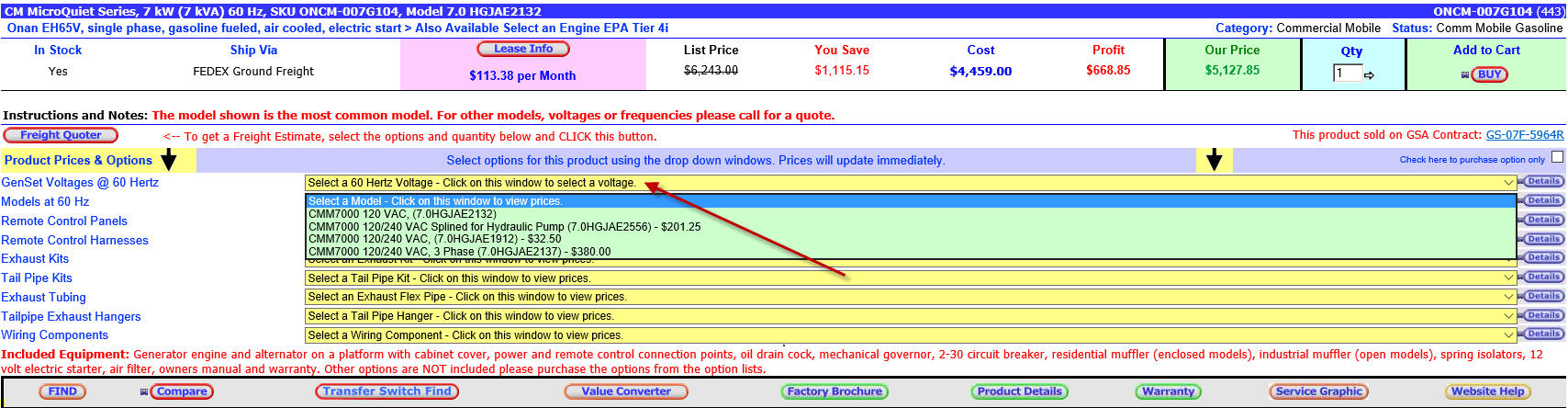
To look up prices on models or options, go to the product you are interested in. Look for the yellow option bars as shown below. This is an example from one product. Place your mouse arrow on the window you want to open and click and hold the mouse button down and the menu will drop down. The window will show a list of options with prices for each item. The example below shows how the drop down window works. While continuing to hold the mouse button down, scroll down the list to highlight the option you want. Release the mouse button to leave the item you want highlighted. The bar will change color and the price on the price bar for that product will change the price for that option selection. The "Our Price" on the product page will change according to the models or options selected. To see details about the option you are interested in click on the "Details Button" In some cases you may want to purchase the option without buying the main product. If this is allowed a check box will appear at the top of the options list >. Option only To purchase the option only check the box and select the option you want and Click the BUY button. That option will be placed in the shopping cart. |
 .
.